Prism Cuts
How Cuts work on the Prisms page and how to open one in Lenses.
Related guides: Intro to Prisms · Arrays · Prisms for Devs overview
What is a Cut?
A Cut narrows a Prism to a specific filter, answering the same question across the same entities using only that filter's data. For example, California and Alaska can now be separate Cuts of the same U.S.-level Prism.
Finding Cuts on Prisms
Cuts are on the Prisms page. Each category shows Overall first, followed by state groups from A to Z. You can also search—for example, by state name on location Cuts.
Use the Cuts filter chip to focus the page on Cut views. Selecting a member under a state group opens the Cut drawer with growth, share, and metadata for that filter.
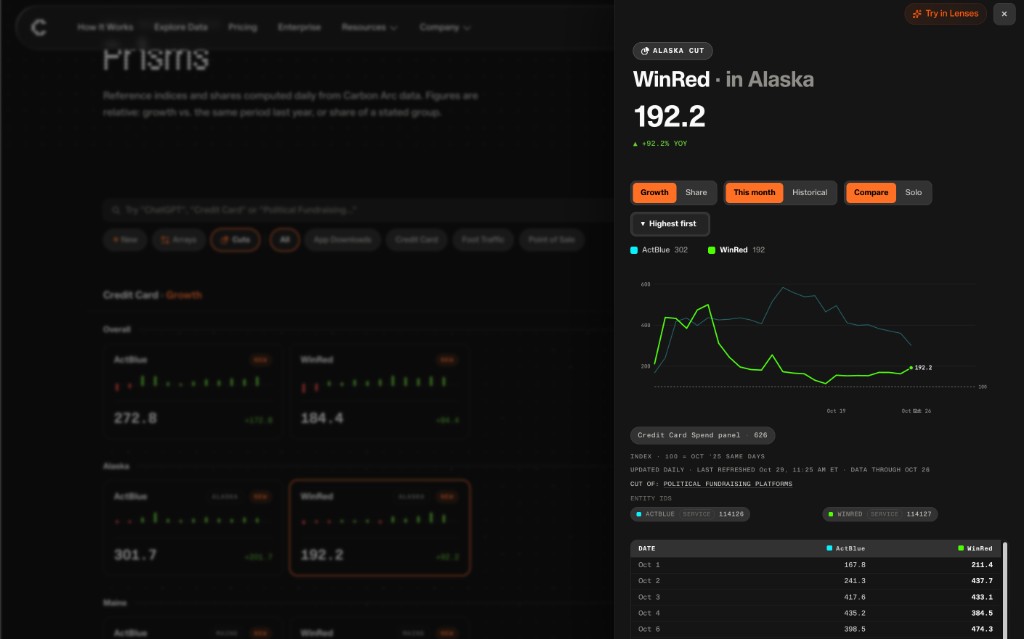
Try a Cut in Lenses
Try in Lenses on a Cut carries the filter into your question—for example: Which political fundraising platform is growing fastest in Alaska?
Open Lenses from the Cut drawer to ask follow-ups with the same entities and location already in context.