MCP Pricing
This page explains how token consumption works when accessing Carbon Arc data through the MCP Server — whether natively through Lenses or non-natively via an LLM such as Claude or ChatGPT.
MCP Subscription Overview
Access to the Carbon Arc MCP Server is included in Professional and Business subscription plans at no additional fee beyond the monthly or annual subscription. Enterprise plans have custom pricing tailored to an organization's needs.
Pricing information for each plan can be found at carbonarc.ai/pricing.
MCP Token Types
Carbon Arc MCP tokens are dedicated for use with Carbon Arc's MCP Server and cannot be used to purchase frameworks in Builder or programmatically. They are tracked separately from platform tokens. There are two kinds of MCP tokens:
Daily MCP Tokens
- Allocated automatically based on your subscription plan
- Reset every 24 hours at 12:00 AM Eastern Time
- Unused daily tokens expire at the time of refresh
- Cannot be purchased or transferred
- Do not affect the Primary Wallet balance
Primary MCP Tokens
- Purchased separately and added to your account
- Never expire
- Consumed only after the daily allotment has been exhausted
- Provide continuity when the daily limit is reached
How MCP Token Consumption Works
MCP token usage is based on the volume and structure of data returned by the Carbon Arc MCP Server in response to a query. Queries that request broader time ranges, more entities, or more granular outputs will typically consume more MCP tokens than narrower, aggregated requests.
While MCP tokens and platform tokens both query the same underlying data using the same structured framework objects and are priced using the same $/MB rate, they are not 1:1. The number of tokens consumed may differ depending on how an LLM interprets and constructs the framework object (e.g., entities, insights, time, and space filters). A query like "Show me Walmart credit card spend in 2025" may consume a different number of tokens when executed via the MCP Server compared to purchasing a similar framework through the Builder.
To keep costs down, limit the scope of your query (e.g., date range, geography, entity set) and request higher-level summaries where possible.
Which Tools Consume MCP Tokens?
Not all MCP tool calls consume Carbon Arc MCP tokens.
| Tool Type | Example | Consumes Tokens? |
|---|---|---|
| Discovery tools | Search Entities, Search Insights, Get Entities, Get Insights | No |
| Analytical tools | Text-to-Insight, Framework-to-Insight, and all Research tools (Entity Research, Forecast, etc.) | Yes |
Research mode evaluates a larger range of data assets and generates comprehensive reports. It consumes more MCP tokens than core tool calls.
LLM Token Costs
Carbon Arc MCP tokens and LLM tokens are not the same. MCP tokens govern access to Carbon Arc's data, while LLM tokens govern model computation.
- Lenses: Carbon Arc covers the LLM token costs through a self-hosted model
- Non-native access: Users are responsible for LLM token costs associated with their own LLM account (e.g., Claude or ChatGPT subscription)
Checking Your Token Usage
In Lenses
- The price for each MCP tool call is displayed natively in the UI
- Daily token consumption and limits are shown in Lenses and on the Wallet page in the User Portal
Non-natively (Claude, ChatGPT, etc.)
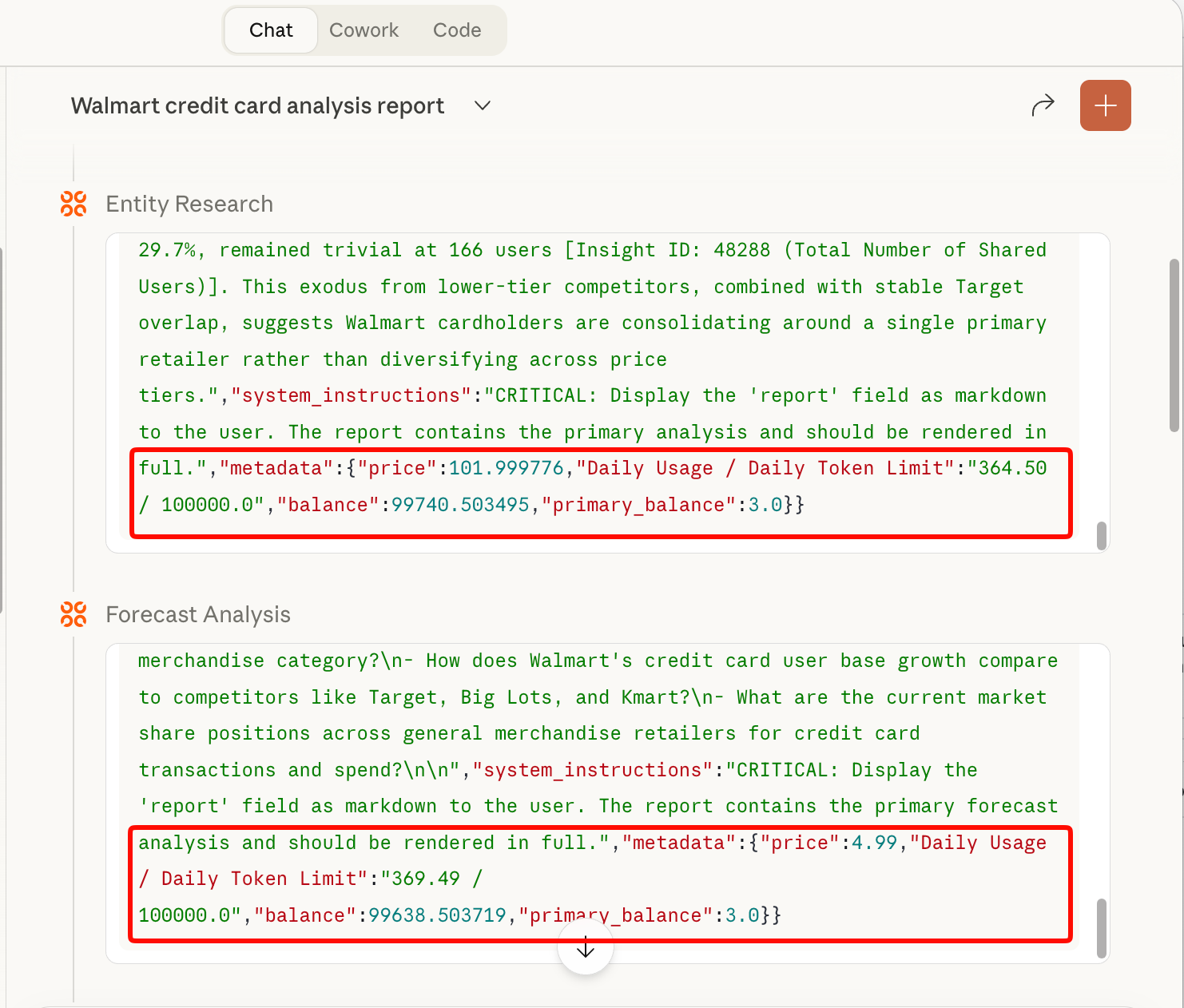
Most LLMs display a tool call "result" that you can expand. At the bottom of each result, the price, available balance, and daily limit are returned.
What Happens When You Hit the Daily Limit
If your daily MCP token limit is reached, you have several options:
- Purchase Primary MCP tokens to continue using the Carbon Arc MCP Server immediately
- Upgrade your plan (e.g., from Professional to Business) via the Subscription page in the User Portal
- Contact support@carbonarc.co to upgrade as an Enterprise user
- Wait until your daily token limit resets at 12:00 AM Eastern Time
Why Token Cost Cannot Be Predicted Before a Query
Because the exact size and composition of the returned data (e.g., number of entities, time series density, applicable filters) are not known until the query is executed, MCP token usage cannot be precisely calculated in advance.
Any MCP Server or LLM-driven data retrieval system must first resolve a natural language prompt into a structured query and execute it against underlying data assets before determining how much data will be returned. Token consumption is inherently dependent on the output of the query rather than the input prompt alone.
Re-running Queries
Every prompt, orchestration, and result can be different. You cannot re-run a previous query (even if identical) without consuming additional MCP tokens.
If a query fails or times out, MCP tokens should not be consumed. If you believe tokens were incorrectly charged, contact support@carbonarc.co.
For more help, contact support@carbonarc.co