Intro to Builder
Builder is where you create a framework. It works like an ecommerce checkout for data. Pair an entity (e.g., AMZN) with an insight (e.g., Credit Card Spend), or an Event like Earnings Releases, choose your filters, get a price, and purchase only the data you need.
A framework combines:
- Entity: who or what you're analyzing
- Insight: the metric you want to measure
- Event (Beta): an optional point-in-time event
Once your framework is ready, you can review the price and purchase it.
Watch a Video Walkthrough
How Builder Works
Builder has three steps.
| Step | What you do |
|---|---|
| Start | Choose where to begin: Entity, Insight, or Event |
| Pair | Add the matching piece |
| Configure | Select companies, filters, and other options, then review pricing |
Use the stepper at the top of the page to see your progress. You can reset and start over at any time.
Start Your Framework
Choose one of three starting points.
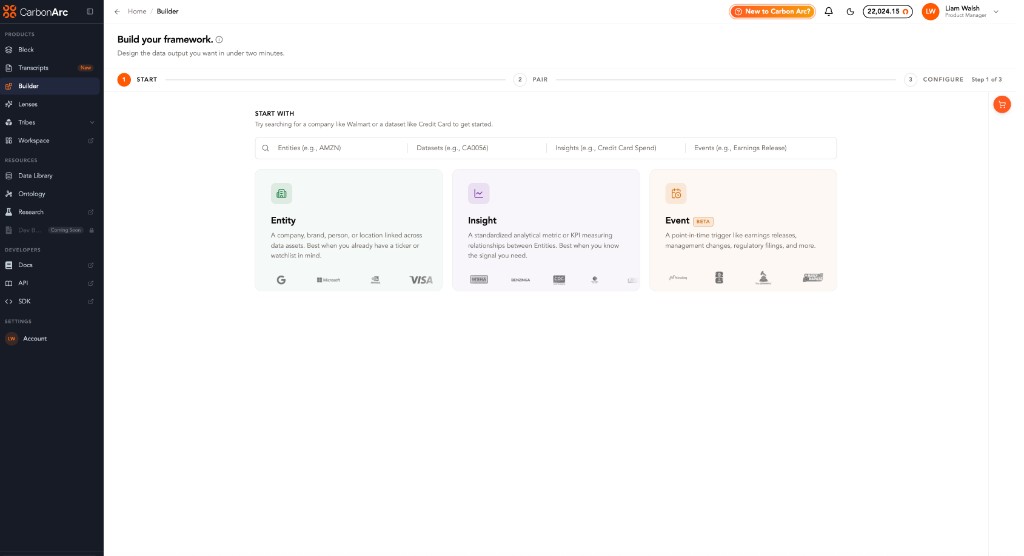
| Start with | Best for | Example |
|---|---|---|
| Entity | You know the company or organization | e.g. Starbucks |
| Insight | You know the metric you want | e.g. Credit Card Spend |
| Event (Beta) | You want to analyze around an event | e.g. Earnings Release |
You can also search directly.
Search is organized into:
- Entities
- Datasets
- Insights
- Events
For example, search for AMZN, CA0056, Credit Card Spend, or Earnings Release.
Pairing Rules
Builder only shows valid combinations.
| Start with | Pair with |
|---|---|
| Entity | Insight |
| Insight | Entity or Event |
| Event | Insight |
Example
The most common workflow is:
- Start with an Entity.
- Pair it with an Insight.
- Configure your companies, filters, and dates.
- Review the price and purchase the framework.
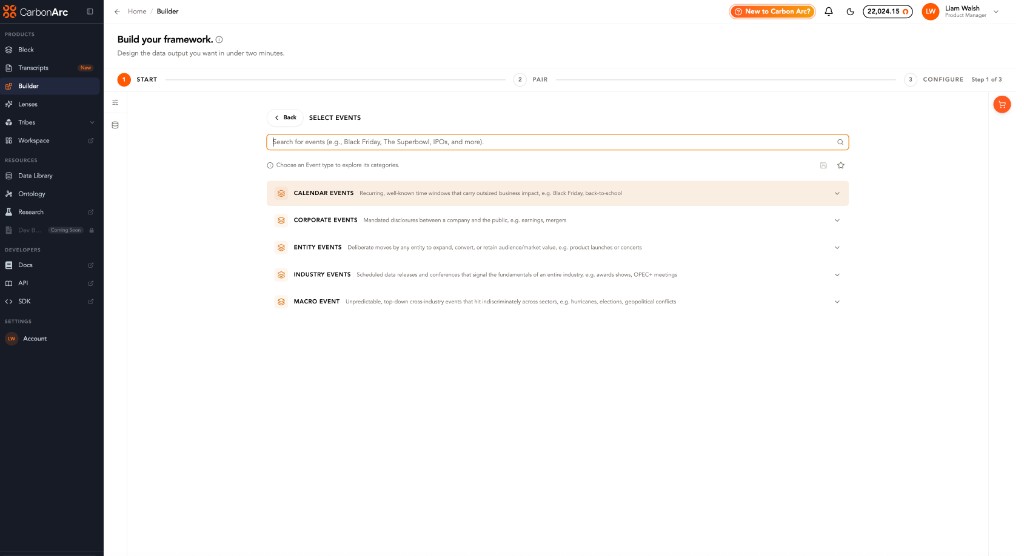
Using Events (Beta)
You can also start with an Event.
- Choose an Event, such as Corporate Events → Earnings Release.
- Pair it with an Insight.
- Configure companies and filters.
During Beta, Events and Insights may be purchased separately.
Tips
- Search when you know exactly what you're looking for.
- Browse using the cards if you're exploring.
- Datasets appear before Insights because they contain multiple Insights.
- If a combination isn't supported, Builder won't show it.
- Use Reset to start over.
Builder at a Glance
| Builder is | Builder isn't |
|---|---|
| A way to build frameworks | A dashboard |
| A combination of Entities, Insights, and optional Events | Unlimited free data |
| A guided Start → Pair → Configure workflow | A news feed or calendar |
| Where you review pricing and purchase frameworks | An automatic answer generator |
Builder FAQs
1. How do I start a framework?
Open Builder, then choose Entity, Insight, or Event (Beta) as your starting point — or search directly for something like AMZN, Credit Card Spend, or Earnings Release.
2. Can I use Entity-first, Insight-first, or Event-first flows?
Yes. All three are supported. Builder only shows valid pairings:
- Entity → Insight
- Insight → Entity or Event
- Event → Insight
3. Can I layer multiple Entities and Insights into one purchase?
Yes. You can layer multiple Entities and Insights into one timeseries.
4. Can I save my favorite pairs?
Yes. Use Favorites, which is built into the main Builder workflow.
Need help? Contact us at support@carbonarc.co