Events (Beta)
What is Events?
Events lets you build analysis around a point-in-time trigger instead of starting with a company or dataset.
An Event can be an earnings release, management change, regulatory filing, economic release, Black Friday, or any other event in the Carbon Arc ontology.
Use Events to answer questions like:
- How did customer spending change around earnings?
- Which companies were affected by Black Friday?
Events is available as a Beta starting point in Builder. You can also add Events later when building from an Insight or Entity.
What are Events?
Events let you build analysis around a point in time.
An Event can be an earnings release, regulatory filing, management change, economic release, Black Friday, or any other event in the Carbon Arc ontology.
Events work alongside Entities (who) and Insights (what happened) to add a third dimension: when.
For example, instead of asking:
What was Starbucks' credit card spend?
You can ask:
How did Starbucks' credit card spend change around earnings?
The Building Blocks
| Component | Purpose | Example |
|---|---|---|
| Entity | Who you're analyzing | Starbucks |
| Insight | What you're measuring | Credit Card Spend |
| Event | When you're measuring it | Earnings Release |
Together, these form the framework used throughout Builder.
How Builder with Events Works
Builder follows the same three-step workflow regardless of where you start.
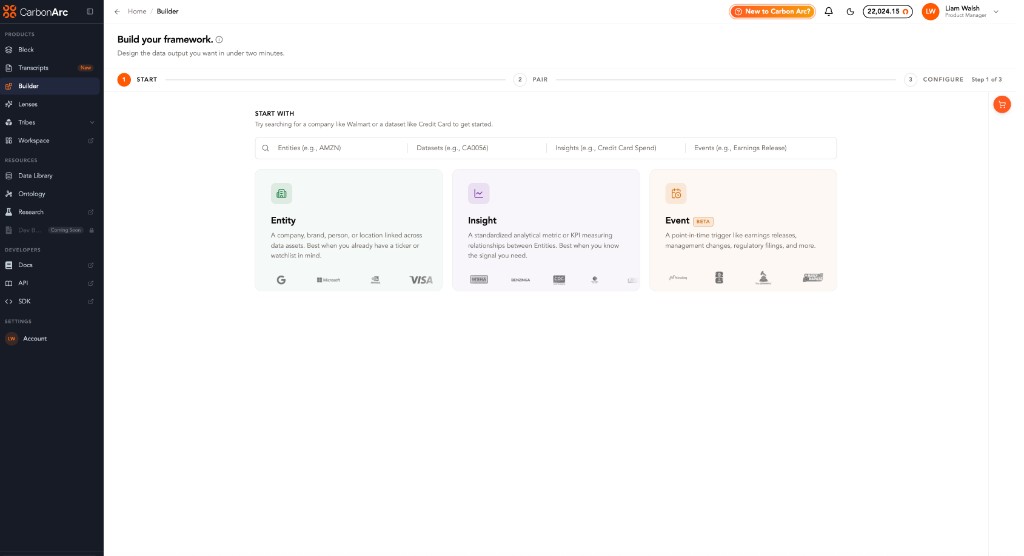
1. Start
Choose your starting point:
- Entity
- Insight
- Event (Beta)
2. Pair
Connect a compatible object.
For example:
- Event → Insight
- Insight → Entity
- Insight → Event
3. Configure
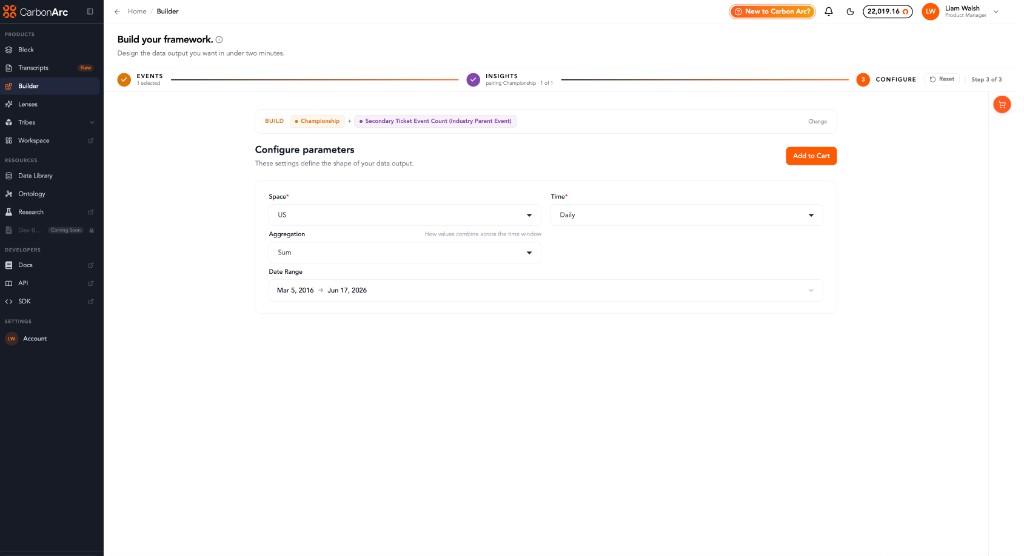
Choose the companies, filters, and options that define your final analysis.
Finding Events
You can browse Events or search directly from Builder.
Search is organized into four sections:
- Entities
- Datasets
- Insights
- Events
Try searching for:
- Earnings Release
- Black Friday
- IPO
- AMZN
- Credit Card Spend
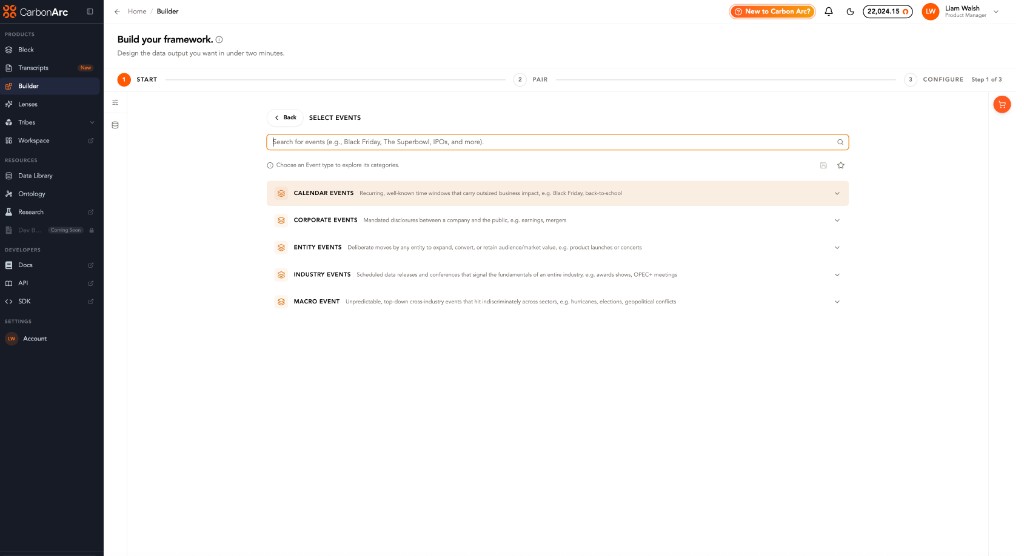
Event Structure
Events are organized into three levels:
- Event Type: Corporate Events, Calendar Events, Macro Events, Industry Events, Entity Events
- Category: Earnings Release, Product Launch, Black Friday
- Event: A specific event within that category, when available
You can analyze an entire category or a specific event.
Some Events are marked Historic, meaning they contain historical data with a fixed cutoff rather than a live feed.
Using Events
You can use Events in three ways:
- Start with an Event, then pair an Insight.
- Start with an Insight, then add an Event (Coming soon).
- Start with an Entity, pair an Insight, then optionally narrow the analysis with an Event (Coming soon).
Events at a Glance
| Events are | Events are not |
|---|---|
| Point-in-time analysis | A news feed or calendar |
| Part of the Builder workflow | A replacement for Entities or Insights |
| Searchable by type and category | Coverage of every real-world event |
| Available in Beta | Live streaming event data |
Ways to Use Events
Start with an Event
Choose Event as your starting point.
Select:
- Event Type
- Category
- Specific Event (when available)
Then pair it with an Insight and configure your analysis.
Best when you already know the event you want to analyze.
Example: How did spending change around earnings releases?
Start with an Insight
Choose an Insight first, then pair it with an Event.
Best when you already know the metric you're interested in.
Example: Credit Card Spend during earnings season.
Start with an Entity
Choose an Entity, then pair an Insight.
If supported, you can optionally narrow the analysis using an Event before configuring the framework.
Best when you're primarily analyzing a specific company.
Understanding the Event Hierarchy
Events are organized into three levels.
| Level | Example |
|---|---|
| Event Type | Corporate Events |
| Category | Earnings Release |
| Event | Individual earnings event |
You can analyze an entire category, such as all Earnings Releases, or select a specific event when available.
Some Events are marked Historic, indicating the data has a fixed historical cutoff rather than a live feed.
Pairing Rules
Builder only allows compatible combinations.
| Start With | Can Pair With |
|---|---|
| Entity | Insight |
| Insight | Entity or Event |
| Event | Insight |
If an Event isn't available for a selected Insight, Builder will let you know.
Configure
Configure is where you finalize your analysis.
Choose:
- Companies
- Filters
- Event scope
- Insight options
Once configured, review the framework and add it to your cart.
During Beta, Events and Insights are purchased separately where applicable.
Best Practices
- Start with Events when the question centers on a moment in time.
- Start with an Entity when you're analyzing a company.
- Start with an Insight when you already know the dataset or metric.
- Use event categories for broader analysis and specific events when you need more precision.
- Historic Events contain historical data only and are not live.
Events at a Glance
| Events is | Events isn't |
|---|---|
| A way to build analysis around a point in time | A replacement for Entities or Insights |
| Part of the Builder workflow | A standalone reporting tool |
| Compatible with Insights and Entities | A live news feed or calendar |
| Available in Beta | Coverage of every real-world event |
| Supports historic event analysis | Real-time streaming data |