Ontology
The ontology tool lets you ask natural-language questions about the Carbon Arc knowledge graph. Explore how companies, brands, products, datasets, insights, events, topics, locations, and other entities connect across the platform.
Just ask a question in plain English. The tool translates it into a validated, read-only graph query and returns the results as a markdown table.
- Tool:
ontology - Cost: Free
- Access: Available on both the public (
/mcp/) and research (/mcp/research/) MCP endpoints
When to Use It
Use the Ontology tool anytime you want to understand how things connect across Carbon Arc.
Example questions:
- What brands does Walmart own?
- What apps does Nike have?
- What sector is Walmart in?
- What subcategories exist under Beverages?
- What cities are in California?
- What topics do Walmart and Costco share?
- What tearsheets cover Walmart?
- What insights are available for Walmart?
- How many companies are in the graph?
- What relationship types are supported?
When to Use Another Tool
The Ontology tool answers relationship questions. It does not return metrics, documentation, or dataset definitions.
| Looking for... | Use |
|---|---|
| Metrics, values, or trends | text_to_insight |
| Dataset documentation or field definitions | data_library |
| Product documentation | search_docs |
| Finding an entity or insight by name | search_entities or search_insights |
Parameters
| Parameter | Required | Description |
|---|---|---|
question | Yes | Your natural-language question. |
entity_ids | No | Pin a specific entity if you need to retry with an exact match. Only use IDs returned by Carbon Arc tools. |
reranker | No | Advanced option to override entity resolution. Most users can ignore this. |
In most cases, all you need is the question parameter.
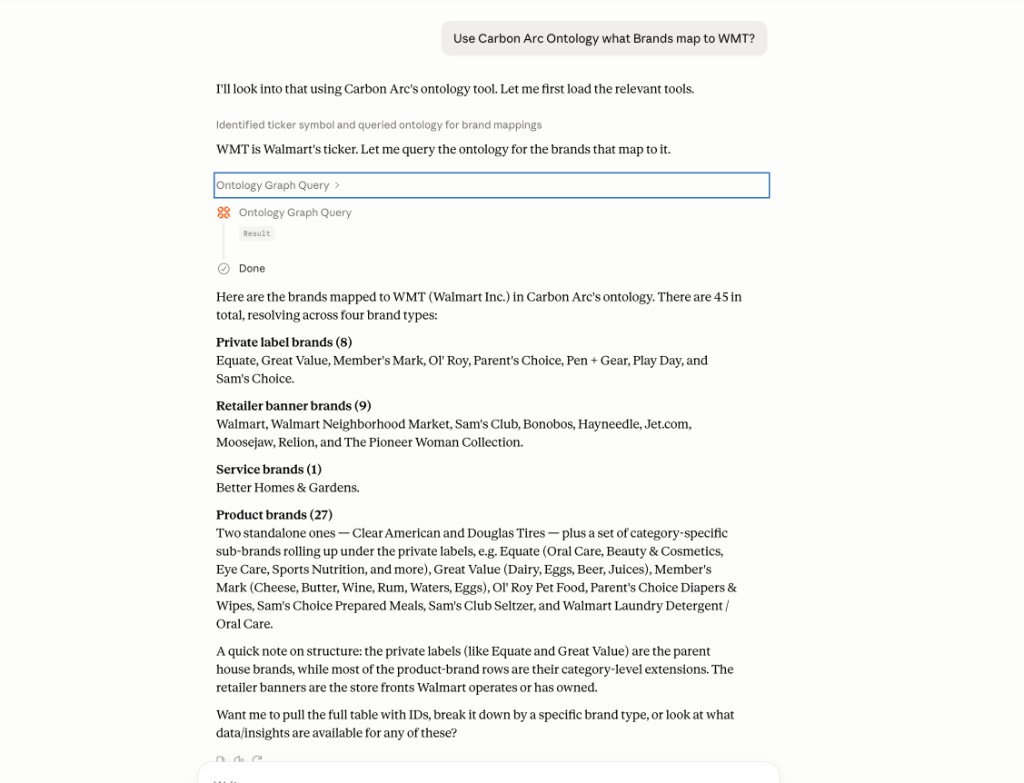
Example
{
  "question": "What brands does Walmart own?"
}
Retrying With a Specific Entity
If the wrong entity was matched, retrieve the correct entity_id using search_entities or from a previous ontology response, then retry:
{
  "question": "What brands does Walmart own?",
  "entity_ids": [
    {
      "entity_id": 28368,
      "entity_representation": "retailer"
    }
  ]
}
Common entity representations include company, retailer, topic, subject, tearsheet, and insight.
Response
Each response includes three sections:
data: Results returned as a markdown table.system_instructions: Guidance for displaying the results.metadata: Additional information including row counts, summaries, returned columns, resolved entities, and suggested follow-up actions.
Troubleshooting
If your results look incorrect or come back empty:
- Check
entity_resolution_metadatato see which entity your question matched. - If needed, use
search_entitiesto find the correct entity. - Retry using the returned
entity_idandentity_representation.
Never guess entity IDs.
How It Works
When you ask a question, the tool:
- Matches your request to a validated graph query.
- Resolves any entities referenced in your question.
- Executes a read-only query against the Carbon Arc knowledge graph.
- Returns the results as a markdown table.
The tool is read-only and cannot modify data. It simply helps you explore the relationships that already exist in the Carbon Arc knowledge graph.