Web Content
Web Content is a growing collection of alternative datasets on the Carbon Arc platform — covering pricing, inventory, job postings, reviews, app metrics, cloud infrastructure costs, and more. Each feed tracks specific insights (metrics) for specific entities (companies, products, tickers) over time.
Access Methods
What Is Web Content?
Web Content datasets are structured, regularly updated feeds sourced from public web data. Examples include:
- Chipotle menu pricing — average item prices by category
- Tesla inventory pricing — total vehicle prices by week
- Eventbrite event counts — daily event volume trends
- Carvana vehicle listings — incentivized prices, transport costs, review counts
- AWS / GCP / Nebius cloud pricing — instance and GPU prices over time
- Job postings — Intuit, Block, Toast, Stripe, Datadog, and dozens more
Finding Web Content in the Data Library
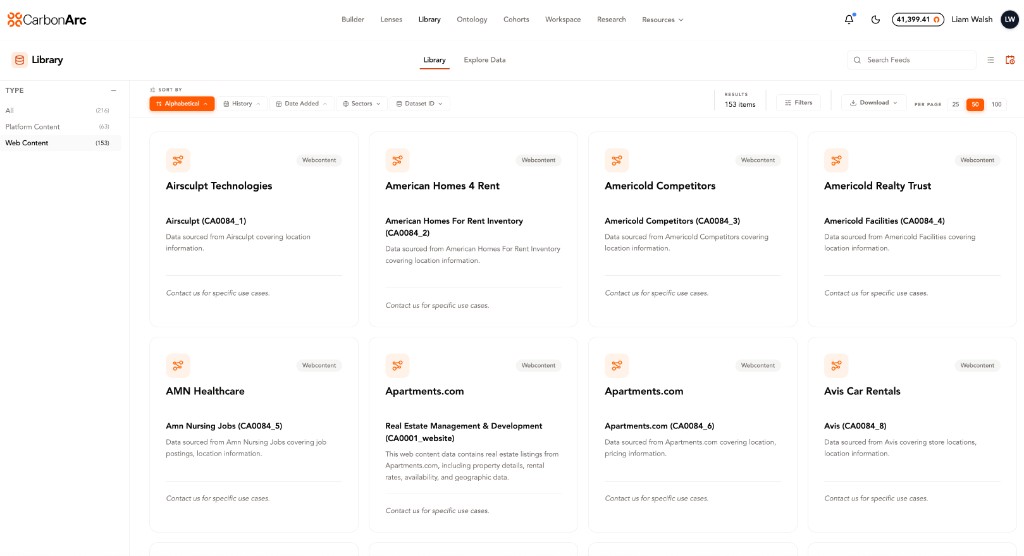
- Navigate to Library in the top nav
- In the left-hand Type filter, select Web Content
- Use Ecosystem and Use Cases to narrow results
- Click any tearsheet to see its description, available insights, entities, and data asset ID
Each Web Content tearsheet has a unique carc_id and URL for direct access.
Available Filters by Dataset
Different Web Content feeds support different filters. Use * as a wildcard to return all values. See some examples below:
| Dataset | Available Filters |
|---|---|
| Carvana Vehicles | make, fuelType, bodyType, year, vehiclePurchaseType, saleStatus |
| Chipotle Menu | category, type, is_available, is_eligible_for_delivery |
| Avis Rentals | carGroup, make, carAvailability, country, state |
| Booking Rentals | carType, agency, category, state |
| Life Storage | size, hasAvailableInventory, isExactSize |
| Tesla Inventory | (none — filters are at data level) |
| Job Postings | Typically no additional filters beyond date/location |
| Cloud Pricing | model (for GPU), instance type varies by provider |
Data Freshness
Web Content feeds update on different schedules — some daily, some weekly. Check each tearsheet in the Data Library for its update cadence and last refresh date. If you notice stale data, contact support@carbonarc.co.
Getting Help
- Data Library: Browse all available Web Content feeds and their metadata
- Lenses: Ask "What Web Content data do you have for [company]?" to discover available insights
- Support: support@carbonarc.co for data questions or access requests