How to Buy Prisms Data
The Prisms page shows ready-made charts. Reading those charts in code is free. This walkthrough buys the spreadsheet-style data behind one chart using tokens, then optionally recomputes index values from that purchase.
API host: https://api.carbonarc.co · Related: Browse Prisms and Read Index Values · Prisms SDK · Intro to Prisms
What you need
- Production API token — Profile from your Carbon Arc Account
- Enough tokens in your balance (for Step 4)
pip install carbonarc pandas
Don't have an account? Sign up here.
Setup
Load your token from the environment (for example with python-dotenv and a local .env file).
import os

from dotenv import load_dotenv
from carbonarc import CarbonArcClient

load_dotenv()

HOST = os.getenv("CARBONARC_API_URL", "https://api.carbonarc.co").rstrip("/")
TOKEN = os.getenv("CARBONARC_API_TOKEN") or os.getenv("CARBONARC_API_TOKEN_PROD")

client = CarbonArcClient(host=HOST, token=TOKEN)
print("API host:", HOST)
print("token loaded:", bool(TOKEN))
Step 1 — Pick a Prism
List live Prisms and choose one. You can also paste a prism_id from the app.
Set PRISM_ID below to buy a specific chart, or leave it None to use the first Prism in the catalog.
PRISM_ID = None  # e.g. paste a prod prism uuid

catalog = client.prisms.list_prisms()
print(f"Live prisms: {len(catalog['prisms'])}")

for p in catalog["prisms"][:5]:
    print(" -", p["title"], "|", p["prism_id"])
if len(catalog["prisms"]) > 5:
    print(" ...")

if PRISM_ID is None:
    PRISM_ID = catalog["prisms"][0]["prism_id"]

print("\nUsing prism_id:", PRISM_ID)
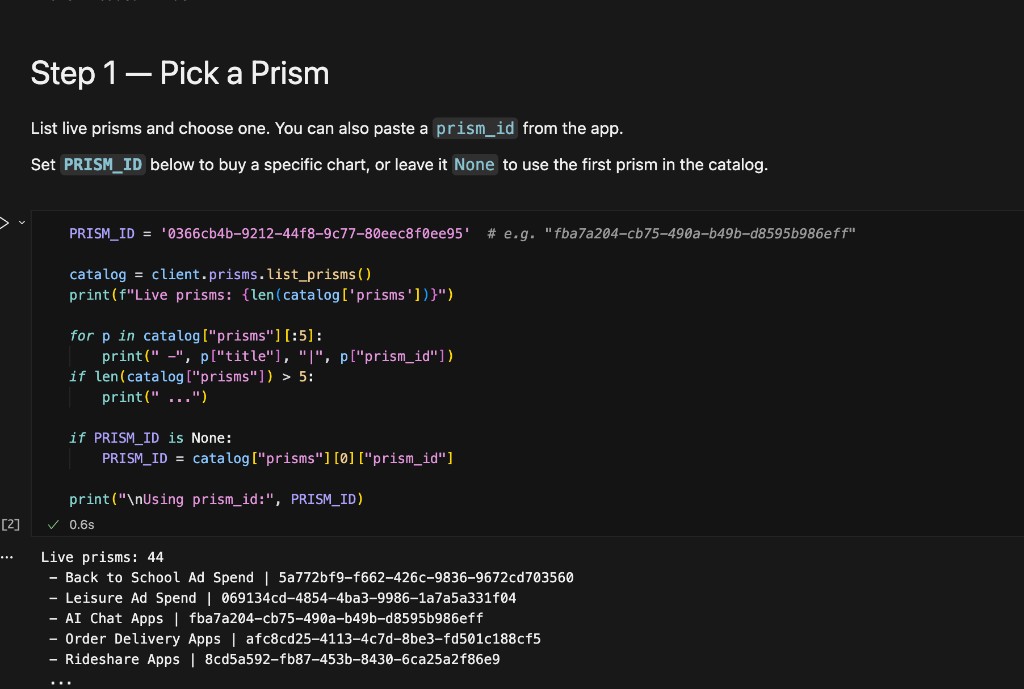
You can also copy ids from Prisms in the app.
Step 2 — Get the recipe (framework)
The catalog does not include the buy recipe. get_prism is free (no tokens).
prism = client.prisms.get_prism(PRISM_ID)
print(prism["title"])
print("Data through:", prism.get("data_through"))
print("Framework present:", "framework" in prism)

recipe = prism["framework"]
Keep date_range on the recipe exactly as the API returns it when you price and buy.
Step 3 — Price and balance (optional)
Check what the buy will cost and how many tokens you have. Pricing uses client.explorer; balance uses client.client (platform API on the same host).
recipe_for_pricing = dict(recipe)
recipe_for_pricing["filters"].setdefault(
    "date_range",
    {"start_date": "2024-09-01", "end_date": "2026-09-16"},
)

price = client.explorer.check_framework_price(recipe_for_pricing)
print("Price:", price)

balance = client.client.get_balance()
print("Balance:", balance)
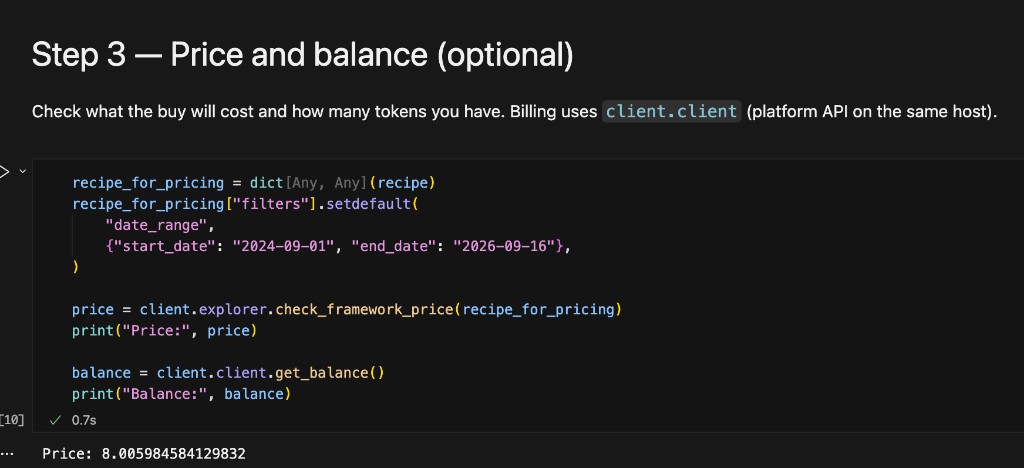
If pricing fails on dates, set date_range on the recipe to match the window you need (Steps 3–4).
Step 4 — Buy
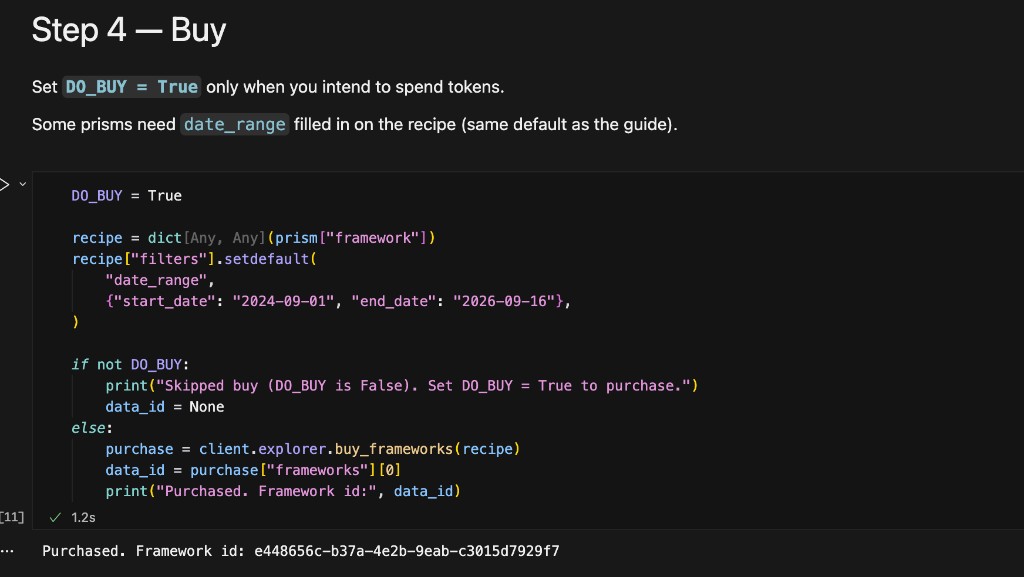
Set DO_BUY = True only when you intend to spend tokens.
Some Prisms need date_range filled in on the recipe (same default as Steps 3–4).
DO_BUY = False  # set True to purchase on prod

recipe = dict(prism["framework"])
recipe["filters"].setdefault(
    "date_range",
    {"start_date": "2024-09-01", "end_date": "2026-09-16"},
)

if not DO_BUY:
    print("Skipped buy (DO_BUY is False). Set DO_BUY = True to purchase.")
    data_id = None
else:
    purchase = client.explorer.buy_frameworks(recipe)
    data_id = purchase["frameworks"][0]
    print("Purchased. Framework id:", data_id)
Step 5 — Download your data
- Use
data_type="dataframe"(otherwise you get a raw dict, not a pandas table). - Re-download an earlier purchase with
DATA_IDinstead of repeating Step 4. - When the download succeeds, you should see a dataframe with the underlying data values — entity names, dates, and metric columns such as
daily_app_downloads— not the relative growth indexes shown on the Prisms page.
DATA_ID = None  # paste framework uuid to skip Step 4

framework_id = DATA_ID or data_id
ACTIVE_FRAMEWORK_ID = framework_id

if not framework_id:
    print("No framework id — complete Step 4 or set DATA_ID.")
    table = None
else:
    print("Framework id:", ACTIVE_FRAMEWORK_ID)
    print("Prism:", prism.get("title"), "| prism_id:", PRISM_ID)

    table = client.explorer.get_framework_data(
        framework_id=framework_id, data_type="dataframe"
    )
    print("Rows:", len(table), "| Columns:", list(table.columns))
    print(table.head())
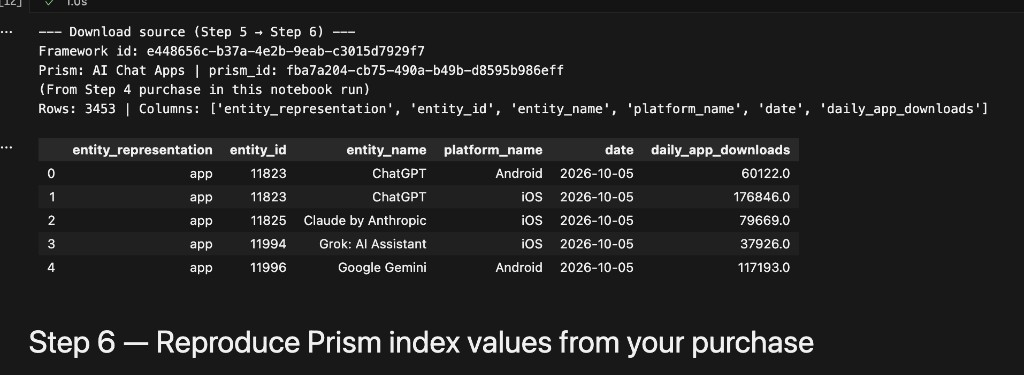
Chain for later steps: PRISM_ID → prism["framework"] → buy → data_id / ACTIVE_FRAMEWORK_ID → table.
Step 6 — Reproduce equal-weight index (all entities)
No extra API calls. Uses table from Step 5.
Step 6 is the equal-weight year-over-year index across every entity in the purchase (100 = flat vs last year). The helpers live in carbonarc.prism_index.
from carbonarc.prism_index import (
    compute_prism_index,
    latest_index_value,
    normalize_purchased_timeseries_df,
)

daily = normalize_purchased_timeseries_df(table)
index_df, coverage_df, data_through = compute_prism_index(daily)

print("Framework id:", ACTIVE_FRAMEWORK_ID)
print("Prism:", prism["title"], "| prism_id:", PRISM_ID)
print("Data through:", data_through)
print("Latest index (100 = flat YoY):", latest_index_value(index_df))
print(index_df.tail(10))
print(coverage_df.tail(3))
Step 6 — Plot (optional)
import matplotlib.pyplot as plt
import pandas as pd

plot_df = index_df.copy()
plot_df["month_dt"] = pd.to_datetime(plot_df["month"] + "-01")
y = plot_df["value"].astype(float)

fig, ax = plt.subplots(figsize=(10, 3))
ax.plot(plot_df["month_dt"], y, marker="o")
ax.axhline(100, color="gray", linestyle="--", label="Flat YoY (100)")
ax.set_title("Reproduced equal-weight index from purchased data")
ax.set_ylabel("Index")
ax.legend()
plt.xticks(rotation=45)
plt.tight_layout()
plt.show()
Install chart support if needed: pip install matplotlib.
Step 6b — One entity (e.g. DoorDash)
For a single brand on the Prism page (not the group index in Step 6):
List entities in your purchase
from carbonarc.prism_index import list_framework_entities, compute_entity_prism_series

entities = list_framework_entities(table)
print(entities)
Recompute that entity’s series
ENTITY_NAME_CONTAINS = "DoorDash"  # or None
ENTITY_ID = None  # e.g. 1561
ENTITY_REPRESENTATION = "app"  # use with ENTITY_ID

hist, mtd, info = compute_entity_prism_series(
    table,
    entity_id=ENTITY_ID,
    entity_representation=ENTITY_REPRESENTATION if ENTITY_ID else None,
    entity_name_contains=ENTITY_NAME_CONTAINS if not ENTITY_ID else None,
)
print("Entity:", info["entity_name"])
print("Key:", info["entity_key"], "| data through:", info["data_through"])
print("Latest mtd_yoy:", mtd.dropna(subset=["value"]).iloc[-1].to_dict())
print(hist.tail(10))
print(mtd.tail())
hist— monthly YoY (value≈ Prismhist_yoy)mtd— daily YoY in thedata_throughmonth (≈ Prismmtd_yoy)
Compare to the Prism API (optional, free)
api_entity = next(
    (e for e in prism["entities"] if e["entity_name"] == info["entity_name"]),
    None,
)
if api_entity and api_entity.get("mtd_yoy"):
    print("API mtd_yoy:", api_entity["mtd_yoy"][-1])
    print("Recomputed:", mtd.dropna(subset=["value"]).iloc[-1].to_dict())
All-in-one (optional)
Spends tokens when enabled.
RUN_ALL_IN_ONE = False

if RUN_ALL_IN_ONE:
    p = client.prisms.get_prism(PRISM_ID)
    r = dict(p["framework"])
    r["filters"].setdefault(
        "date_range",
        {"start_date": "2024-09-01", "end_date": "2026-09-16"},
    )
    purchase = client.explorer.buy_frameworks(r)
    table = client.explorer.get_framework_data(
        framework_id=purchase["frameworks"][0], data_type="dataframe"
    )
    print(table.head())
If something goes wrong
| Problem | What it usually means |
|---|---|
| 401 | Token missing or wrong for this host. |
404 on get_prism | Wrong prism id, or not published. |
| Buy fails / not enough tokens | Check balance; add tokens in the app. |
| Buy fails on dates | Set date_range on the recipe (Steps 3–4). |
'dict' object has no attribute 'columns' | Use data_type="dataframe" in Step 5. |
| ModuleNotFoundError: matplotlib | pip install matplotlib before the plot. |
| ModuleNotFoundError: carbonarc.prism_index | Upgrade carbonarc to a release that includes prism_index. |
Words to know
| Word | Meaning |
|---|---|
| Prism | Ready-made chart Carbon Arc keeps updated. |
| Framework / recipe | Instructions to pull raw data for that chart. |
| Framework id | Uuid after a buy; used to download table. |
| Tokens | Credits spent on Step 4 only. |
| Step 6 index | Equal-weight average of entity YoY across the group. |
| Step 6b | One entity’s hist/mtd series from the same table. |
Related guides
- Browse Prisms and Read Index Values — read indexes without buying
- Prisms API — public catalog and REST reference
- Reconstructing Prism Frameworks — static framework examples when you are not using the live
frameworkfrom the API - Arrays — sector-level benchmarks on the Prisms page
Questions? Contact support@carbonarc.co.