Browse Prisms and Read Index Values
Use the Carbon Arc API and Python SDK to list live Prisms and read the same growth and share index values shown on the Prisms page. Authenticated reads are free — they do not spend tokens.
For the underlying panel data (dollars, visits, downloads, and so on), see How to Buy Prisms Data.
Related: Intro to Prisms · Prisms API · Prisms SDK
What the numbers mean
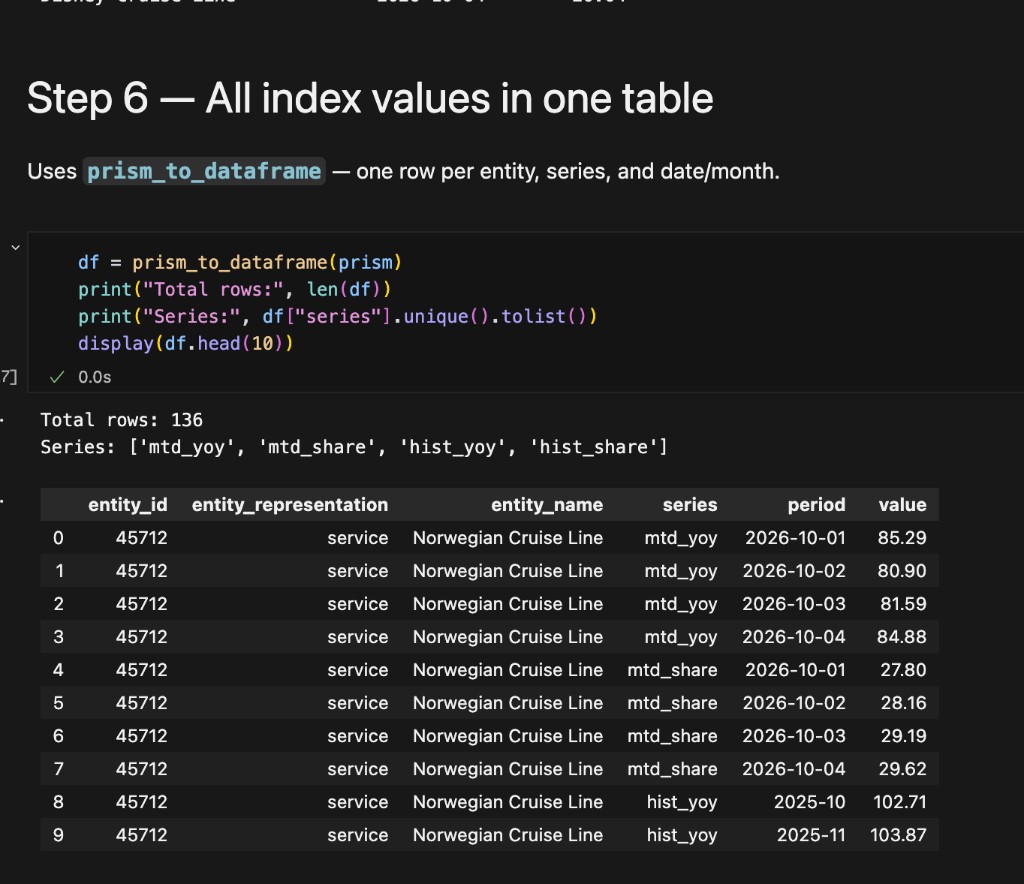
Each entity on a Prism carries four series. Values are indexes and shares, not absolute totals.
| Series | What it is |
|---|---|
mtd_yoy | Month-to-date growth index (daily points in the latest month) |
mtd_share | Month-to-date share of the entity group |
hist_yoy | Growth index by month over the chart window |
hist_share | Share by month over the chart window |
Growth index 100 means flat versus the same period last year. Share is each entity’s portion of the brands on that Prism, not industry-wide market share. See Intro to Prisms for how to interpret the page.
Prerequisites
- A Carbon Arc API token from your profile
pip install carbonarc pandas
import os
from carbonarc import CarbonArcClient
from carbonarc.prisms import prism_to_dataframe

client = CarbonArcClient(
    host="https://api.carbonarc.co",
    token=os.environ["CARBONARC_API_TOKEN"],
)
Store the token in an environment variable. Do not commit it to source control.
Step 1 — List live Prisms
Print each chart title and its prism_id.
catalog = client.prisms.list_prisms()
print("Live prisms:", len(catalog["prisms"]))

for p in catalog["prisms"]:
    print(p["title"], "|", p["prism_id"])
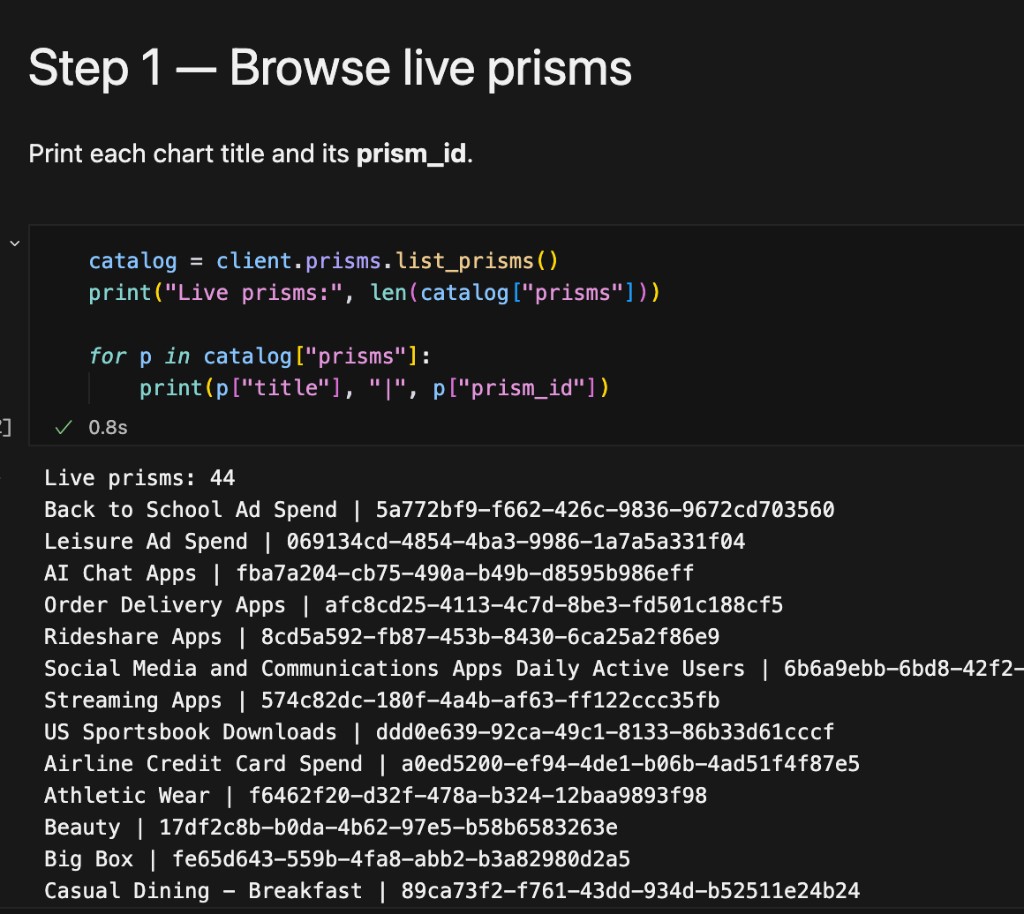
You can also copy a prism id from Prisms in the app.
Filter to Prisms that compute a given insight or cover an entity:
matches = client.prisms.list_prisms(insight_id=775)
# matches = client.prisms.list_prisms(
#     entity_id=36003,
#     entity_representation="service",
# )
list_prisms() is an alias for get_prisms(). With no filters, it returns the full authenticated catalog (same Prisms as the public list, without purchase metadata on each item). Use get_prism() when you need one Prism’s full payload, including framework.
Step 2 — Load one Prism
PRISM_ID = "your-prism-uuid-here"

prism = client.prisms.get_prism(PRISM_ID)

print(prism["title"])
print("Data through:", prism["data_through"])
print("Entities:", len(prism["entities"]))
data_through is the latest day of real underlying data. It can lag today when panels are still settling.
Step 3 — Monthly history for one entity
entity = prism["entities"][0]
for point in entity.get("hist_yoy") or []:
    print(point["month"], point["value"])
Use hist_share the same way when you need share instead of growth.
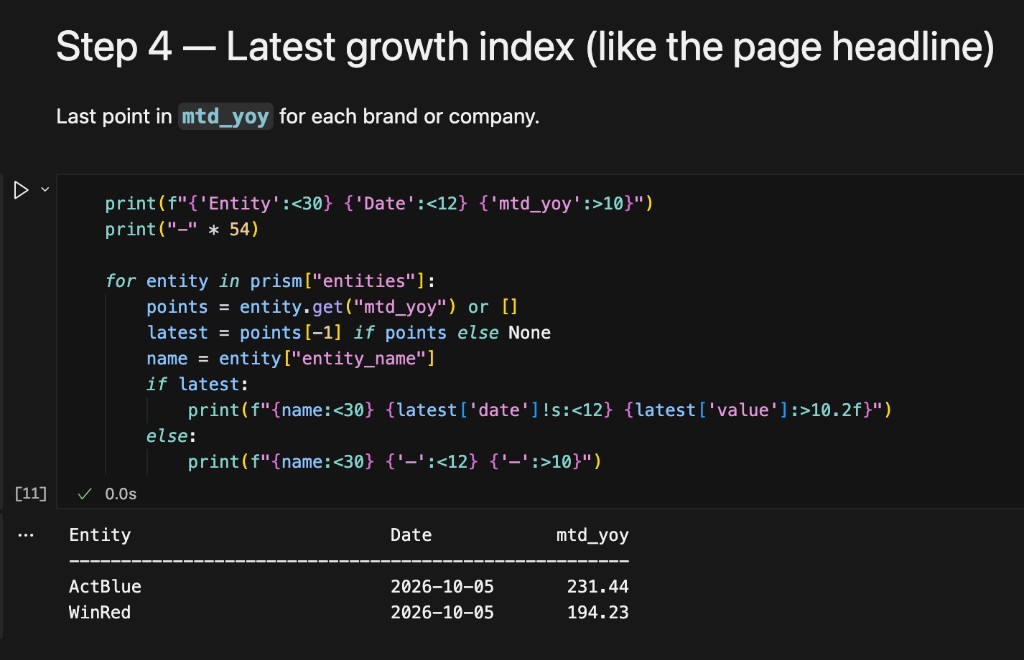
Step 4 — Latest growth index (like the page headline)
Last point in mtd_yoy for each brand or company.
print(f"{'Entity':<30} {'Date':<12} {'mtd_yoy':>10}")
print("-" * 54)

for entity in prism["entities"]:
    points = entity.get("mtd_yoy") or []
    latest = points[-1] if points else None
    name = entity["entity_name"]
    if latest:
        print(f"{name:<30} {latest['date']!s:<12} {latest['value']:>10.2f}")
    else:
        print(f"{name:<30} {'-':<12} {'-':>10}")
Step 6 — All index values in one table
Uses prism_to_dataframe — one row per entity, series, and date or month.
df = prism_to_dataframe(prism)
print("Total rows:", len(df))
print("Series:", df["series"].unique().tolist())
print(df.head(10))
Filter to one series when you need it:
mtd_yoy = df[df["series"] == "mtd_yoy"]
print(mtd_yoy.tail())
End-to-end example
import os
from carbonarc import CarbonArcClient
from carbonarc.prisms import prism_to_dataframe

client = CarbonArcClient(
    host="https://api.carbonarc.co",
    token=os.environ["CARBONARC_API_TOKEN"],
)

catalog = client.prisms.list_prisms()
prism_id = catalog["prisms"][0]["prism_id"]

prism = client.prisms.get_prism(prism_id)
df = prism_to_dataframe(prism)

print(prism["title"], "| rows:", len(df))
print(df[df["series"] == "mtd_yoy"].tail())
Public catalog (no token)
For integrations that must not authenticate:
public = client.prisms.get_public_prisms()
See the Prisms API for the unauthenticated GET /v2/public-prisms reference. For scripts that already have a token, list_prisms() is usually simpler.
Troubleshooting
| Problem | What it usually means |
|---|---|
| 401 | Missing, invalid, or expired API token |
404 on get_prism | Wrong prism id, or the Prism is not published |
Empty mtd_yoy | No data for that entity in the current window |
Related guides
- How to Buy Prisms Data — end-to-end purchase and index reproduction
- Intro to Prisms — read charts in the product UI
- Reconstructing Prism Frameworks — static framework examples
Questions? Contact support@carbonarc.co.