Carbon Arc Skills
Carbon Arc's data infrastructure and MCP server remove the friction from buying and accessing powerful data-based insights; Skills breaks down the barriers to utilizing them.
Carbon Arc Skills is launching in beta. We recommend running plugins in Claude Cowork or Claude Code. Support for additional LLMs will follow in later releases.


Welcome to Carbon Arc Skills
Many companies seek access to outside data to make more informed decisions, but quickly become bogged down by the challenges of sourcing data, paying for an expensive, long-term contract, and having the engineering and analyst resources to leverage it correctly. Carbon Arc's data infrastructure and MCP server remove the friction from buying and accessing powerful data-based insights; Skills breaks down the barriers to utilizing them.
Built on our playbooks
Each Carbon Arc skill is a specialized prompt running on Carbon Arc's MCP Server, based on Carbon Arc's own analytical playbooks. Each skill gives LLMs like Claude the instructions to query the correct data, run the analysis best suited to the use case, and construct a report that can be shared with your team, partners, clients, or executives.
You stay in control
Carbon Arc skills are designed for you to stay in control. Before any data is pulled, Claude shows you what it plans to query. Nothing runs until you approve. All data is auditable and cited to the underlying source.
Grouped into plugins
Skills are grouped into plugins by the subject of your analysis. We're launching with Carbon Arc Company Intelligence and Carbon Arc Talent Intelligence, with more updates on the way.
Launch plugins
Each plugin covers one subject of analysis. Find yours below, install that plugin, and ask for the report. Your first report comes back in one session.
Carbon Arc Company Intelligence
For brand strategy, insights and analytics teams
Informed decisions require a view beyond your own four walls. See how competitors are performing, where your category is moving, who else your customers spend with, and what market events actually did to demand.
It answers questions like:
- 01How do we stack up against our competitors?
- 02Where else do our customers spend?
- 03Which customers are we winning and losing?
- 04What did that launch, price change or competitor move actually do?
- 05What's behind the leader's growth?
For investors and analysts covering listed consumer companies
Conviction going into the print starts with a read on performance well before it.
It answers questions like:
- 01What's the quarter tracking at?
- 02What drove it?
- 03Is it the company or the category?
- 04Do the other datasets agree?
- 05Is the trend a one-off?
For owners and leaders of small and regional businesses
Carbon Arc tracks the category you compete in and the markets you sell in. See whether a slow stretch is yours or everyone's, and what's changing around you.
It answers questions like:
- 01Is it us, or the whole category?
- 02Are the shoppers in our category getting stronger or weaker?
- 03How is the market around us doing?
- 04Are our rising costs a local problem?
- 05What did that promotion or local event actually do?
Carbon Arc Talent Intelligence
For talent management, agencies and labels
Every deal, tour and partnership starts with a clear read on the audience behind the entertainer, measured against their peers.
It answers questions like:
- 01Who is the audience?
- 02Is the audience growing or fading?
- 03Who should they partner with?
- 04Who are our artist's real peers?
- 05Where should they tour?
Video demo
How to install a plugin
Prerequisites
A Carbon Arc account. Sign up here to get your credentials.
A Claude subscription. Any paid plan (Pro, Max, Team, or Enterprise) works.
Once you have both, connect Carbon Arc to Claude and you're ready to run your first query.
Copy this now; you'll paste it into Claude in step 4.
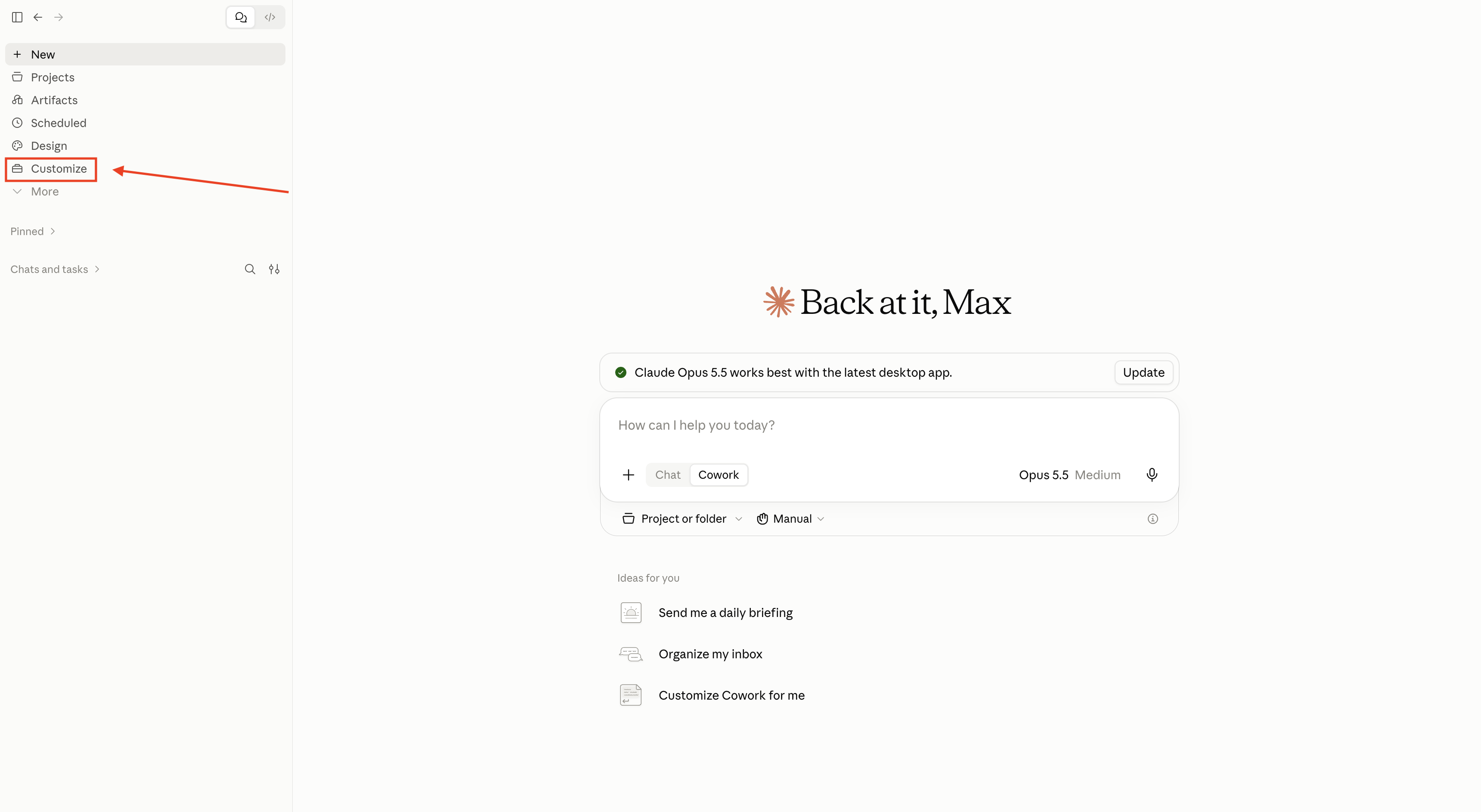
Step 1 of 7: Open Customize
In Claude Cowork, open Customize from the left sidebar.
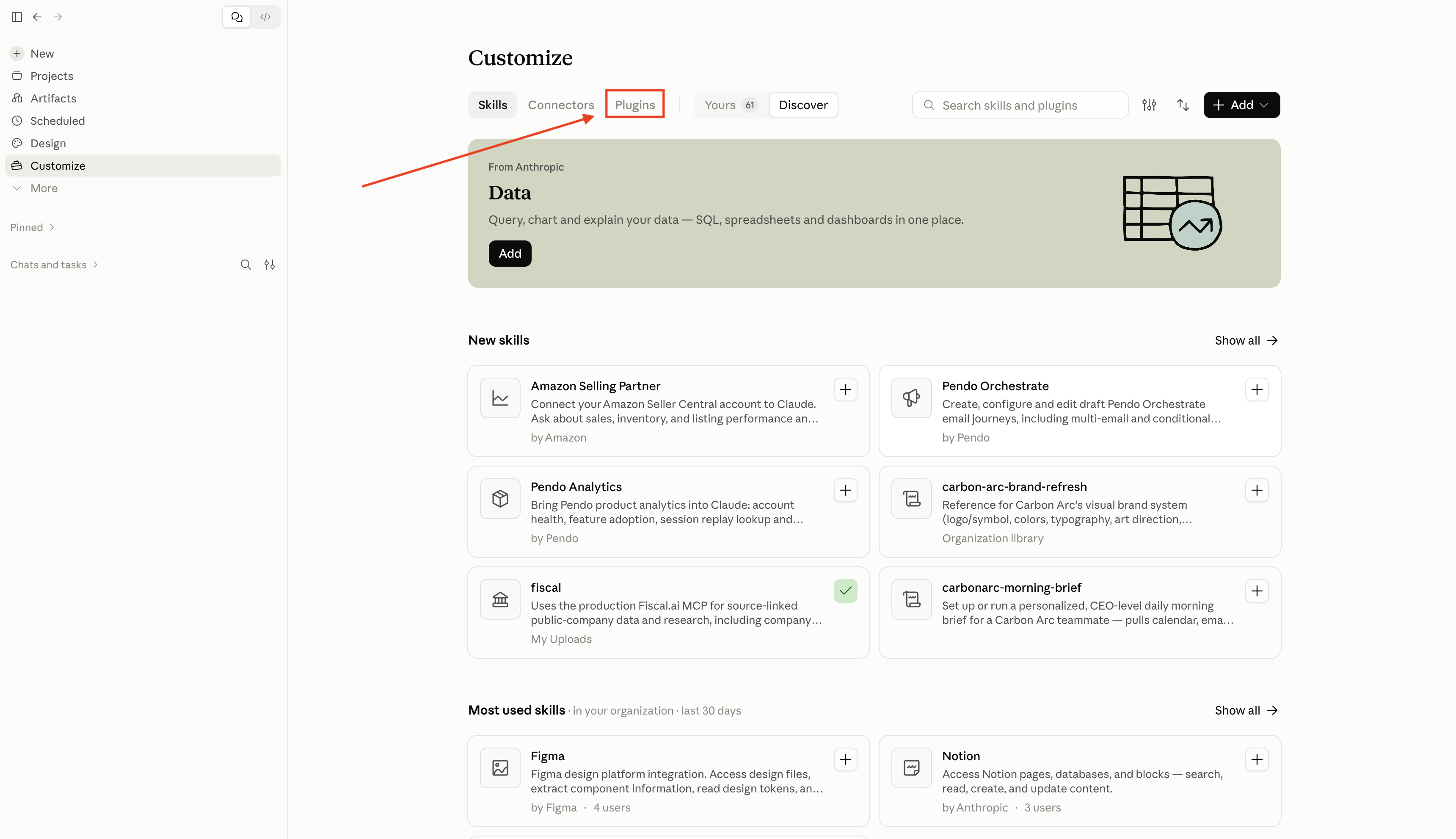
Step 2 of 7: Open the Plugins tab
In Customize, switch from Skills to Plugins.
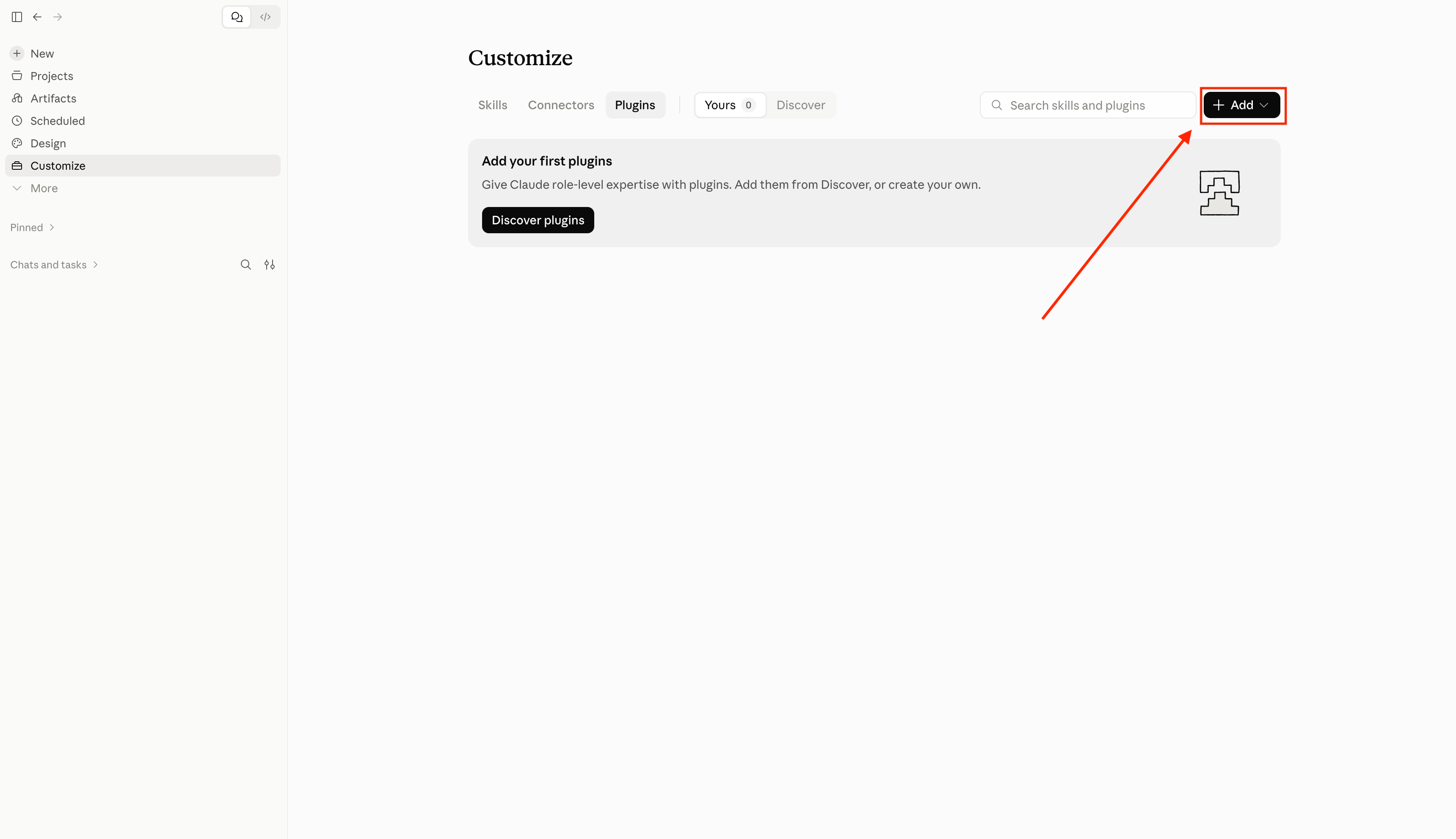
Step 3 of 7: Add a marketplace
Click + Add, then select Add marketplace.
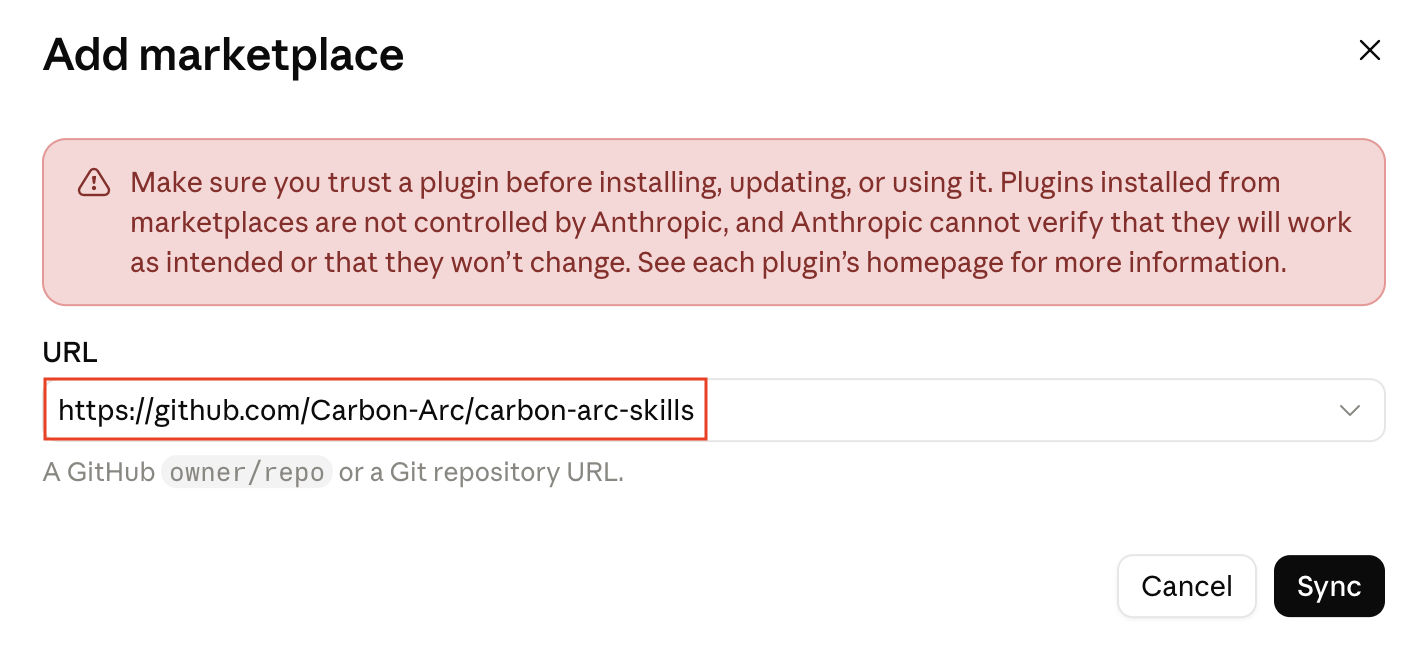
Step 4 of 7: Sync the Carbon Arc Skills Library
In the Add marketplace dialog:
- Paste the marketplace URL
- Leave Sync automatically on
- Click Sync
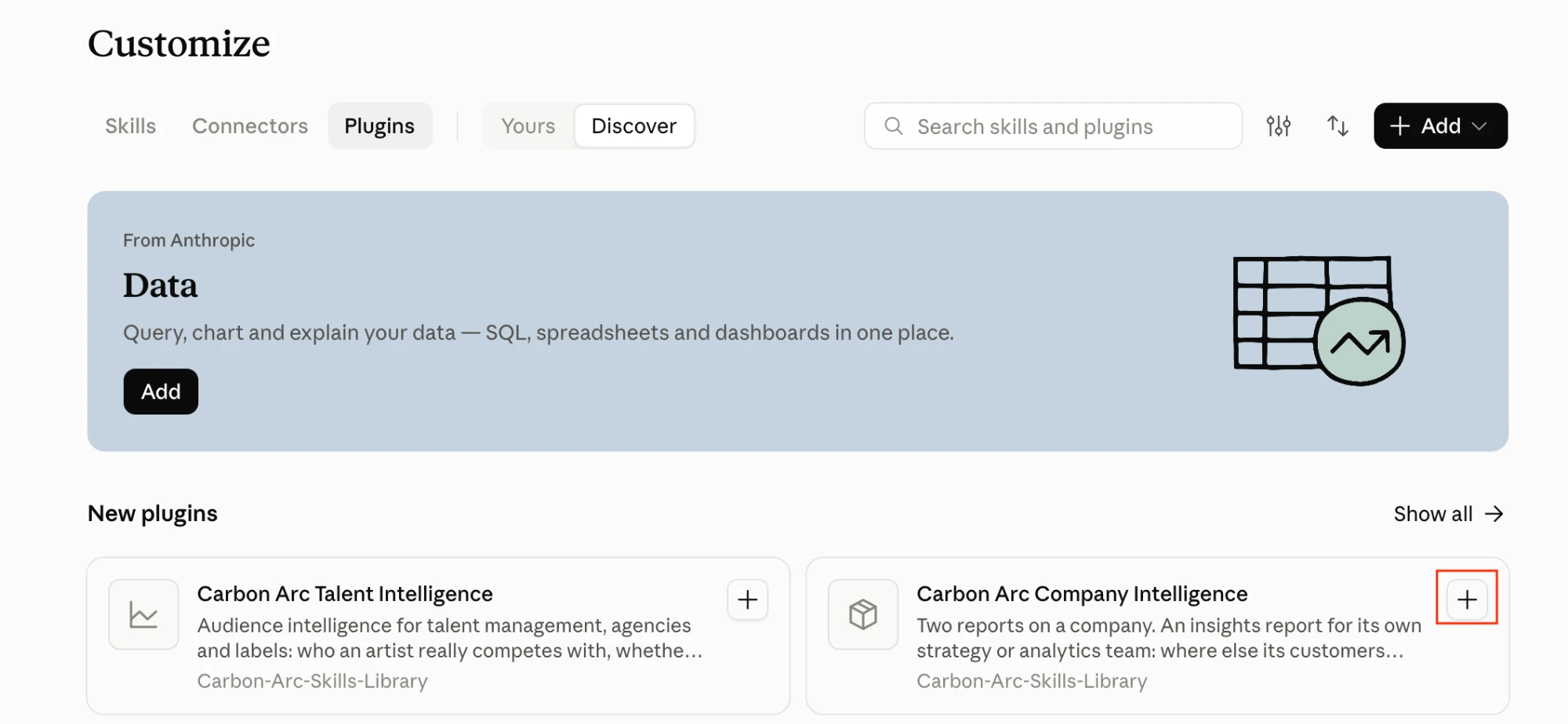
Step 5 of 7: Discover and add a plugin
Open Discover, then click Add on the plugin that matches what you're analyzing:
- Carbon Arc Company Intelligence
- Carbon Arc Talent Intelligence
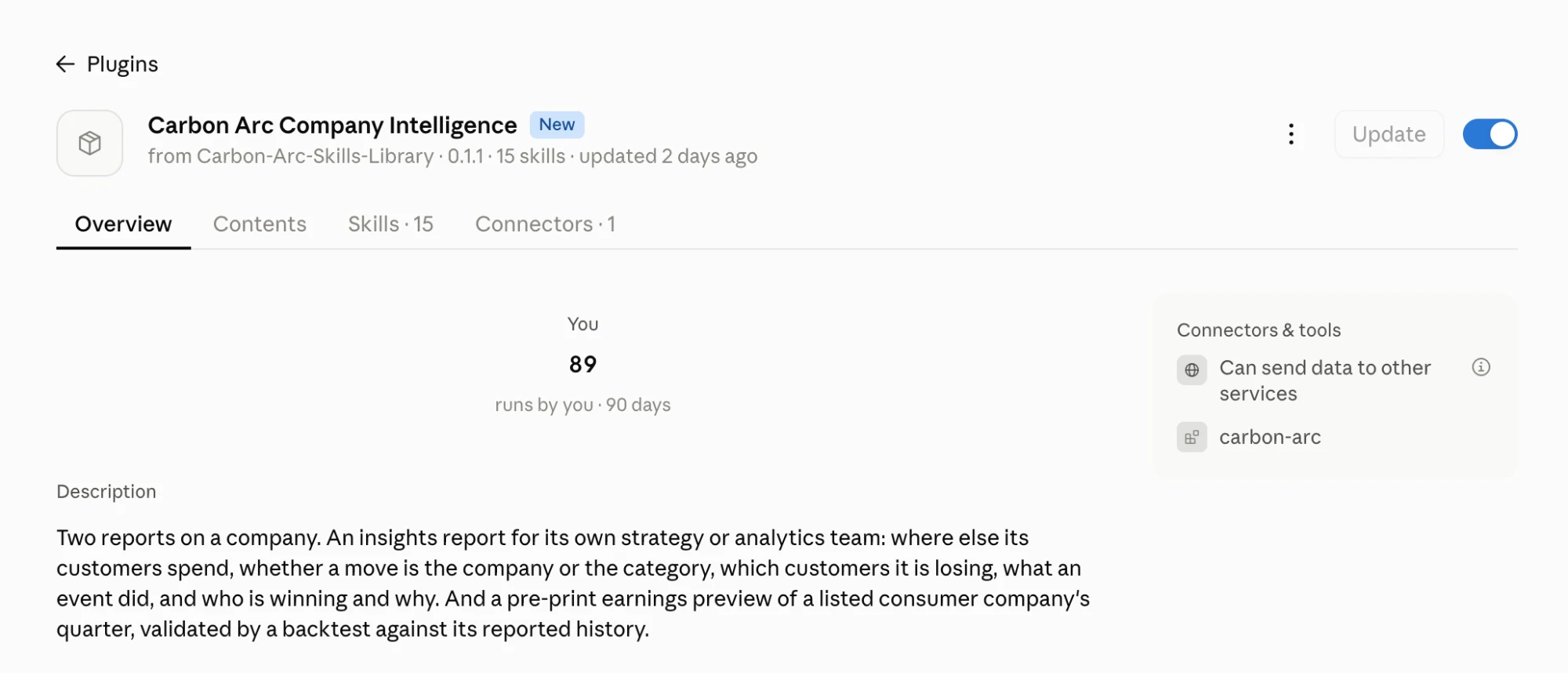
Step 6 of 7: Confirm the plugin is on
Open the plugin overview and confirm the toggle is On. You should see the plugin description, skills count, and the carbon-arc connector listed under Connectors & tools.
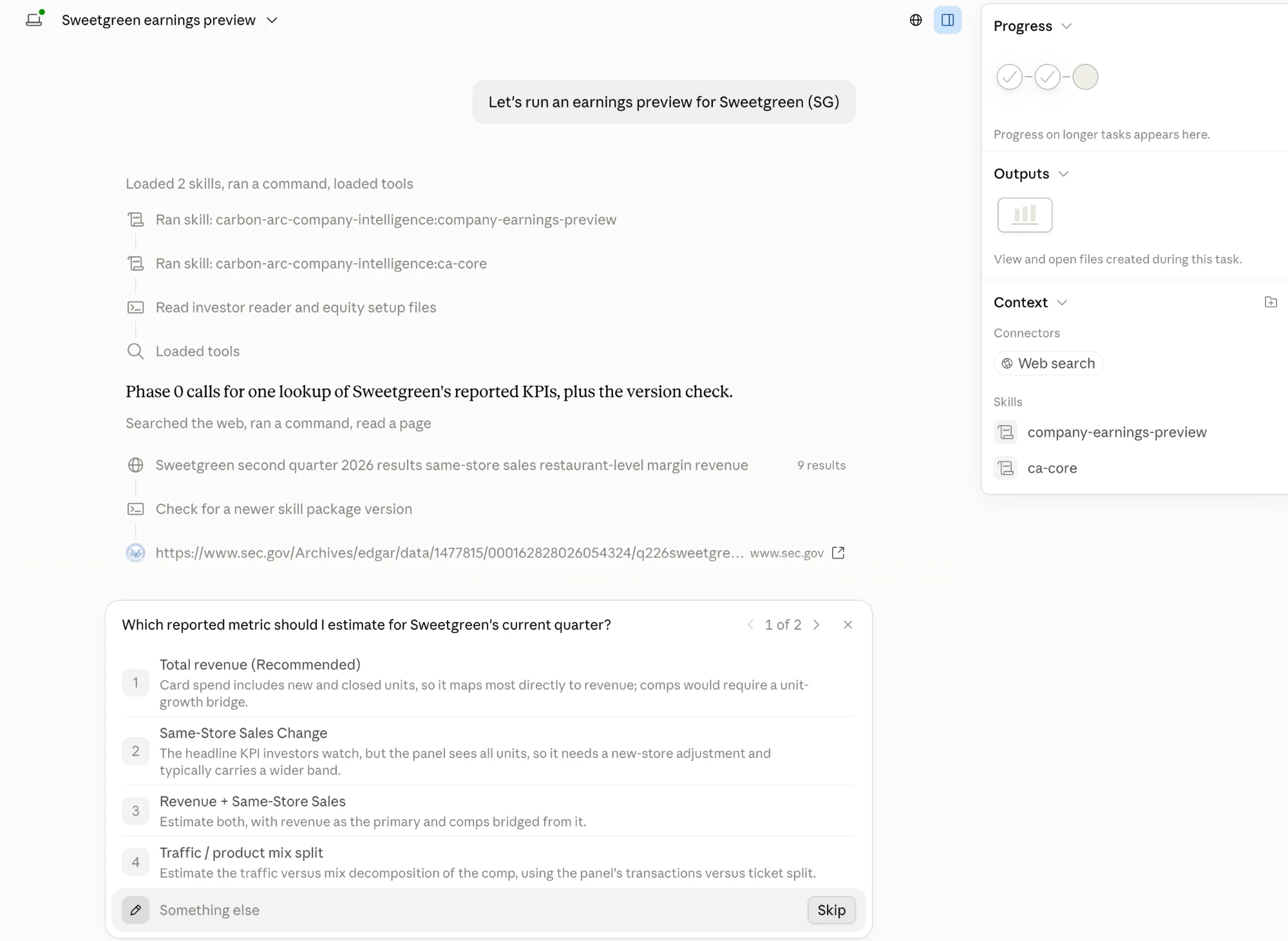
Step 7 of 7: Start your first report
Start a new task and ask for a report in plain language, for example Let's run an earnings preview for Sweetgreen (SG). Claude loads the matching skill, then asks a few scoping questions before it pulls data. Answer them, and the finished report appears under Outputs.
Run a single skill
Generating a full report is the best place to start. Each plugin is built from modular skills, and you can run any of them on its own for a faster, one-page briefing.
Once you have a specific question, skip the full report and run just the skill that answers it. Type / and the skill name, or simply ask the question. For example, if you only want to know how you're tracking against competitors, run /ca-benchmark.
A few Carbon Arc Company Intelligence skills (not the full list)
/ca-benchmarkIs this us or the category? How your demand is moving against named competitors, split into transactions and average ticket./ca-competitive-setWhere else do our customers spend? The brands that share your customers, ranked./ca-eventsDid it work? What a price change, launch, promotion or competitor's incident did to demand./equity-backtestWhat's the quarter tracking at? A listed company's quarter estimate, scored against its own reported history./equity-quarterWhat drove the quarter? Demand week by week, transactions versus ticket, and splits by channel, age and region.
The full reports have their own skills too: /company-insights-report builds the competitive insights report, /company-earnings-preview builds the pre-print earnings preview, and /smb-category-report builds the SMB category report.
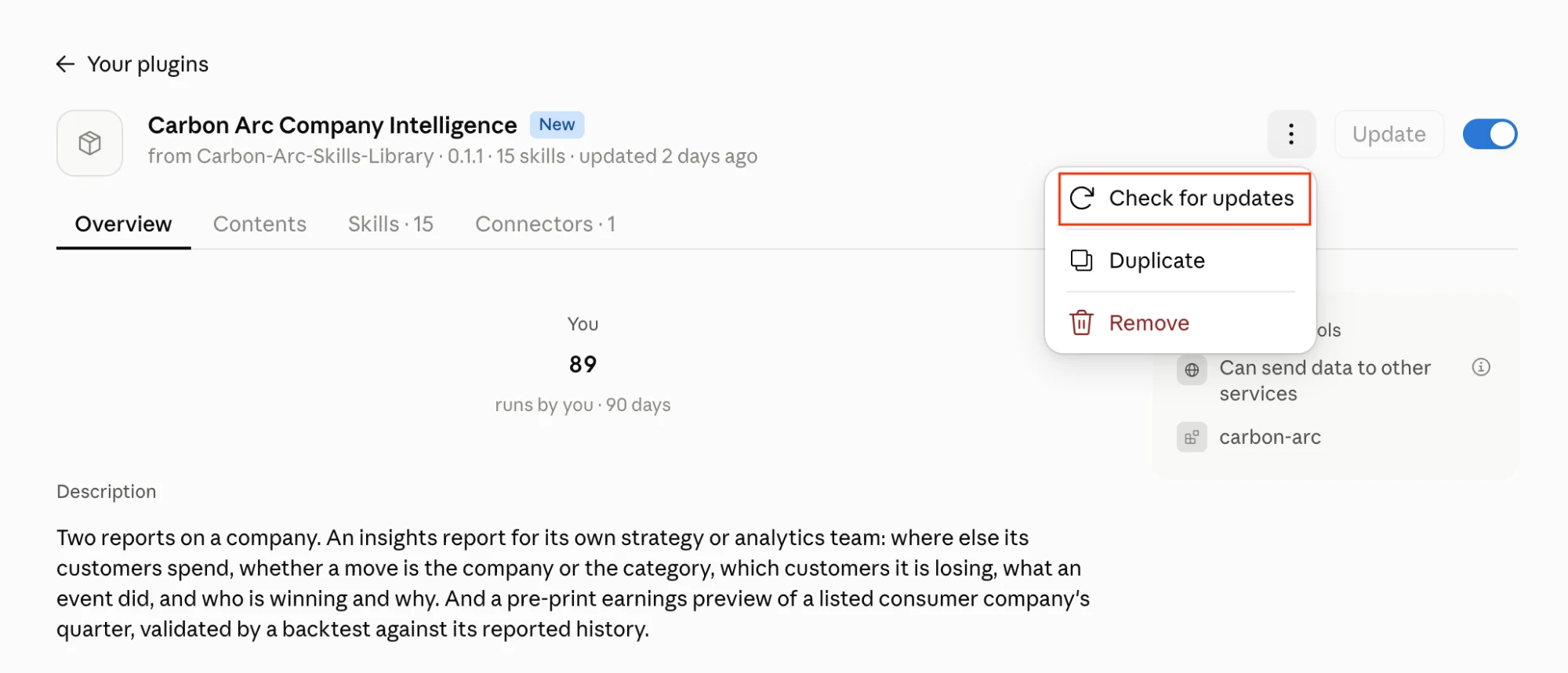
How to update a plugin
When a new version of a plugin is available:
- Open the plugin from Customize → Plugins
- Open the ⋯ menu
- Select Check for updates
- When an update is available, click Update
Updates can take a minute to apply. Quit and reopen Claude for the update to take full effect.
FAQs
What can I expect?
With 300+ data assets available, the question we hear most is "where do I start?" Skills are our answer. Each plugin can produce a full, actionable report from Carbon Arc data in your first session: a competitive read or earnings preview for a company, a category and market read for a small business, or an audience brief on a musician or actor.
We recommend starting with the full report. Claude researches the company, proposes the data it will pull for your approval, runs the analysis through the Carbon Arc MCP, checks its findings with you, and builds a shareable HTML report. Expect about 30 minutes, plus the time you spend reviewing each step.
The first report gives you a baseline of what Carbon Arc data can tell you. After that, you can come back to the plugin with specific questions instead of full reports. Each workflow also runs on its own. The report is a starting point, too: you can ask Claude to dig deeper, change the comparison set, or rework a section, just as in any other conversation.
What do I need to get started?
You'll need:
- A Carbon Arc account. Sign up here to get your credentials.
- A Claude subscription. Any paid plan (Pro, Max, Team, or Enterprise) works.
Once you have both, connect Carbon Arc to Claude and you're ready to run your first query.
How much does it cost?
Adding the Carbon Arc plugins is free. Carbon Arc MCP tokens are consumed to query the data used to build the report or address the use case.
We expect full reports to require between 1,000–2,000 Carbon Arc MCP tokens to produce but the range can vary depending on the LLM. See MCP Pricing for how MCP token consumption works.
Skills also use your Claude plan like any other conversation. A full report is a long, multi-step session, so expect it to use more of your plan's usage than a typical chat.
What's the difference between the Carbon Arc MCP and Carbon Arc Skills?
The MCP is the kitchen: access to the tools, ingredients, and equipment. Skills are the recipes: step-by-step instructions for turning them into something valuable.
What is a plugin?
Per Anthropic, a plugin is a package you install in Claude that tailors how it works for a particular role or team. Carbon Arc plugins provide Claude with ready-made workflows for Carbon Arc data: which datasets answer which questions, the checks that make the results trustworthy, and a report format to present them. Each plugin covers one subject: companies and brands, or musicians and actors. Install the one that matches what you're analyzing.
How do I get the best output?
- Use the strongest model available to you. The reports involve many steps of analysis and checking, and more capable models follow the method more closely.
- Run the skills in Cowork or Claude Code rather than a regular chat.
- Tell Claude who the report is for and what you want to know. "A competitive read for our insights team, focused on whether we're losing share" gets a sharper report than "a report on us."
- Name the competitors you care about. Claude will suggest a peer set. Yours will always be included, and it's usually better than any list the data can produce.
- Take the checkpoints seriously. Claude stops before pulling data and again before writing up findings. That's where your knowledge of your business (like "that competitor isn't a fair comparison" or "that dip was a store closure") saves a rebuild.
Which LLMs are supported?
The beta is built for Claude. Support for other LLMs will follow in later releases.
What's coming next?
This is launching in beta and there is more to come as we iterate. We'll keep customers updated in our weekly release notes.
What data assets do I have access to?
Please note that due to access restrictions set by Carbon Arc's licensors, you may not be eligible to purchase certain data assets and/or content listed on the Carbon Arc platform.
How can I share feedback?
If you have any suggestions or requests, email support@carbonarc.co with subject line Carbon Arc Skills beta feedback, or reach out to your Carbon Arc contact.
Changelog
| Version | Date | Notes |
|---|---|---|
| 0.2.1 | Oct 6, 2026 | New SMB category report in the Company Intelligence plugin, for small and regional businesses. |
| 0.2 | Oct 2, 2026 | Beta launch of Carbon Arc Skills (Company Intelligence and Talent Intelligence plugins). |
Disclaimer: Carbon Arc Skills are a series of markdown files designed to be used with AI tools and Carbon Arc's MCP Server. Skills output may contain errors or inaccuracies, should not be solely relied upon, and do not constitute financial advice. Carbon Arc cannot guarantee that data assets or information featured in Skills will be available to any particular user via Carbon Arc's platform. Use of Skills will result in Carbon Arc MCP Tokens being consumed as data is queried. By making this repository publicly available, Carbon Arc does not grant any license to its name or intellectual property, nor any license to Carbon Arc's data, platform, or MCP Server. Use of Carbon Arc's data, platform, or MCP Server requires a separate agreement with Carbon Arc. Modified versions of Skills are not endorsed or reviewed by Carbon Arc.